
Drupal 7 Ready… To Upgrade To WordPress
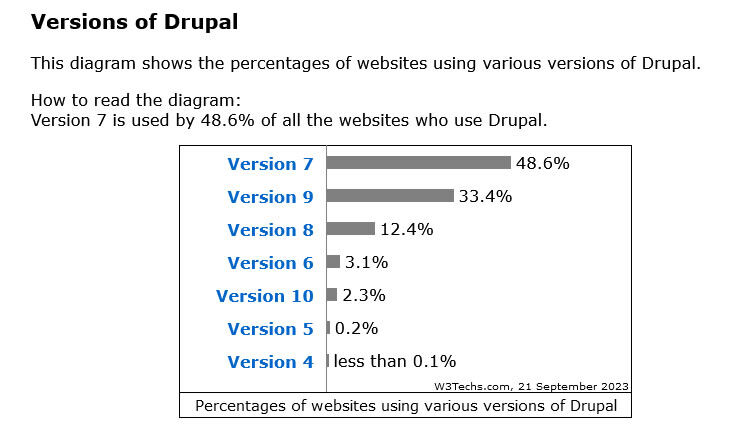 More than a decade after its first release, Drupal 7 is still widely used across the web. It can be found powering civic engagement in government installations; managing vast amounts of content for faculty, students, and staff in educational institutions; and providing the digital backbone for many businesses and non-profit organizations. Many organization still use Drupal 7.
According to Drupal.org, the biggest level of adoption came with Drupal 7. The problem: that product has been outdated for years. Eventually Drupal will close off support for Drupal 7 and when that happens, almost half of the Drupal sites will be unsupported. Do you want a website running on unsupported software?
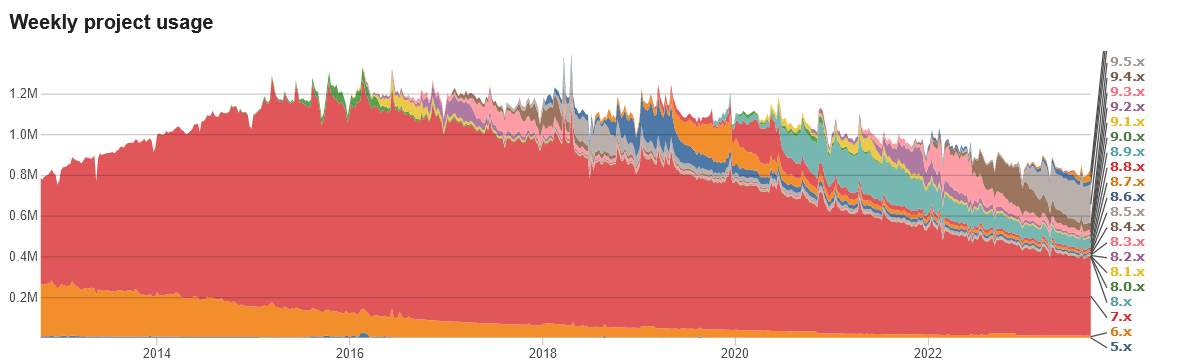
The migration from version to version of Drupal is significant. Many organizations are converting from Drupal 7 to WordPress. We’re here to help with getting your Drupal 7 website ready to be reborn as a cutting edge WordPress website.
Migrating a website from Drupal 7 to WordPress can be a complex process, as the two content management systems (CMS) have different architectures and use different technologies. However, there are several tools and methods available that can help you move your content and functionality from Drupal to WordPress.
People ask: “Can you migrate from Drupal 7 to WordPress?” The answer: yes! There are DIY approaches and companies like Web321 offer support for the conversion process.
Here are some general steps you can follow to migrate your Drupal 7 website to WordPress:
- Backup your Drupal website: Before you start the migration process, it’s important to create a full backup of your Drupal website. This will ensure that you have a copy of your website’s files and database in case something goes wrong during the migration process.
- Install WordPress: Install WordPress on your web hosting account. You can either install it manually or use a one-click installer provided by your web host.
- Export your Drupal content: To migrate your Drupal content to WordPress, you will need to export it in a format that WordPress can understand. You can use the WordPress Importer plugin to import your Drupal content, or you can use a third-party tool like the Drupal to WordPress plugin.
- Import your content into WordPress: Once you have exported your Drupal content, you can use the WordPress Importer plugin to import it into WordPress. The plugin will guide you through the process of importing your posts, pages, and other content.
- Redirect your old URLs: After you have migrated your content to WordPress, you will need to redirect your old Drupal URLs to the corresponding pages on your new WordPress website. This will ensure that any links to your old Drupal website will still work and that you don’t lose any search engine rankings.
- Customize your WordPress site: Once you have migrated your content and set up redirects, you can start customizing your WordPress site to match the look and feel of your old Drupal website. This may involve installing and configuring WordPress themes and plugins to replicate the functionality of your Drupal site.
It’s important to note that the exact steps for migrating from Drupal 7 to WordPress will depend on the specifics of your website and your desired outcome. If you are not comfortable with the technical aspects of the migration process, you may want to consider hiring a professional to handle the migration for you.
Is Your Site Still Running Drupal 7?
If you don’t know what your website is running, let us help.
Put your URL into the form below:
Drupal is a registered trademark of Dries Buytaert.